
tinker-browser
A web browser plugin for TINKER with multi-tab support and search integration.
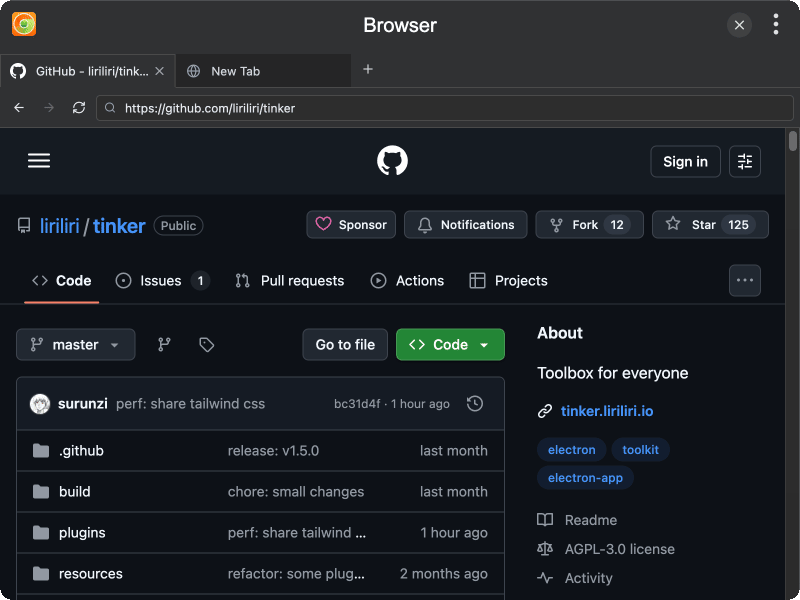
Features
- Multi-tab browsing — open multiple web pages in separate tabs, with drag-and-drop tab reordering
- Address bar with search — enter a URL to navigate directly, or type keywords to search via Google
- Navigation controls — back, forward, reload, and stop buttons for standard browsing
- New tab page with shortcuts — add favorite sites as shortcuts on the new tab page for quick access
- Site management — add, edit, and delete site shortcuts with automatic favicon fetching
- Tab management — open new tabs, close tabs, and switch between them
- Favicon display — shows website favicons in both tabs and site shortcuts
- Loading indicator — visual feedback when a page is loading
Usage
- Click the + button on the tab bar to open a new tab
- Enter a URL or search keywords in the address bar and press Enter
- Use the back, forward, and reload buttons in the toolbar to navigate
- On the new tab page, click the + button to add a site shortcut
- Right-click a site shortcut to edit or delete it
- Click a site shortcut to navigate to that website
- Drag tabs to reorder them