
tinker-color
A color utilities plugin for TINKER that provides an interactive color picker with real-time conversion between multiple color formats and color harmony schemes.
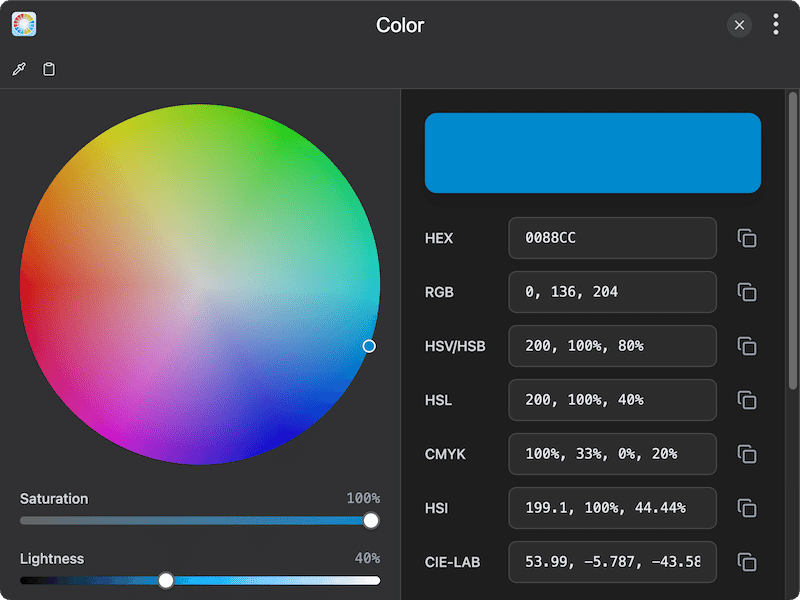
Features
- Color wheel picker — interactive color wheel for intuitive color selection
- Eyedropper tool — pick any color directly from your screen
- Multiple color formats — convert between HEX, RGB, HSL, HSV, CMYK, HSI, and CIE-LAB in real time
- Alpha channel support — adjust transparency with a dedicated alpha slider
- Saturation & lightness sliders — fine-tune color properties with visual gradient sliders
- Color schemes — view complementary color, analogous harmony, and lightness variants
- Copy to clipboard — quickly copy color values in display or CSS-compatible formats
- Paste color — import colors by pasting any supported color string
- State persistence — selected color and settings are preserved across sessions
Usage
- Use the color wheel to select a base color, or click the eyedropper icon to pick a color from your screen
- Adjust saturation, lightness, and alpha using the sliders below the color wheel
- View and edit color values in any of the seven supported formats (HEX, RGB, HSL, HSV, CMYK, HSI, LAB)
- Click the copy button next to any format to copy the value to your clipboard
- Explore color schemes at the bottom: variants, complementary, and analogous harmony colors
- Click any color swatch in the schemes section to apply it as the current color