
tinker-stickies
A sticky notes plugin for TINKER, allowing you to create, edit, and organize colorful sticky notes with rich text support.
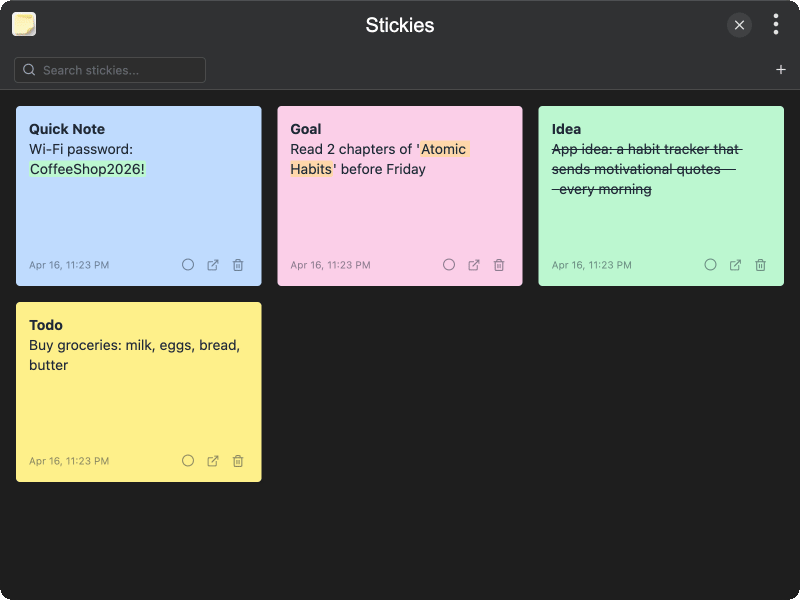
Features
- Rich text editing — format text with bold, italic, underline, strikethrough, and text highlighting
- Color customization — choose from six background colors: yellow, green, blue, pink, purple, and orange
- Text highlighting — highlight text with multiple colors including green, blue, pink, purple, and orange
- Search — quickly find stickies by searching through their content
- Popup window — open any sticky in a separate always-on-top window for quick reference
- Persistent storage — stickies are saved automatically using IndexedDB
- Context menu formatting — right-click selected text to access formatting options
Usage
- Launch the plugin to view all your stickies in a grid layout
- Click the + button to create a new sticky note
- Click on a sticky to enter edit mode and start typing
- Right-click selected text to apply formatting such as bold, italic, or highlight
- Hover over the color circle icon to change the sticky's background color
- Click the Open in New Window button to pop out a sticky into a separate always-on-top window
- Use the search bar to filter stickies by content
- Click the Delete button and confirm to remove a sticky