
tinker-markdown-live
A WYSIWYG markdown editor plugin for TINKER, powered by Milkdown Crepe.
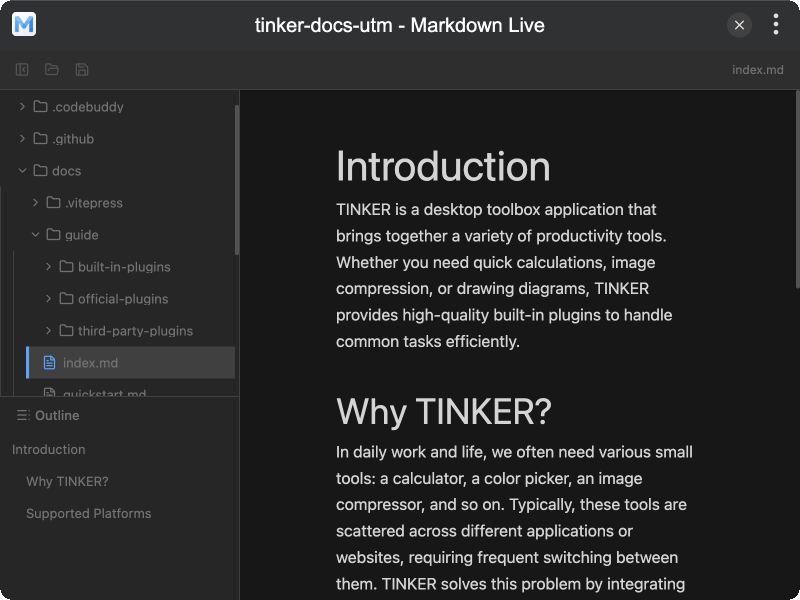
Features
- WYSIWYG editing with live markdown preview
- Slash commands for quick block insertion
- Rich content support including tables, code blocks, LaTeX, and images
- File tree for browsing a project folder and opening
.mdfiles - File management to create, rename, and delete files and folders
- Document outline to jump between headings in the current file
- Auto-refresh file list when the folder changes on disk
- Dark mode support
- i18n support for English and Chinese
Installation
Download and install TINKER, then run:
bash
npm i -g tinker-markdown-liveUsage
- Click Open folder in the toolbar (or in the sidebar) to choose a workspace directory
- Select a markdown file in the file tree to start editing
- Type in the editor or use
/slash commands to insert blocks - Expand Outline at the bottom of the sidebar to navigate headings
- Right-click in the file tree to create, rename, or delete files and folders
- Click Save to write changes; unsaved new files prompt for a save location
- Use the sidebar toggle button to show or hide the file tree