
tinker-cleaner
A system junk cleaner plugin for TINKER that scans and cleans junk files to free disk space.
Features
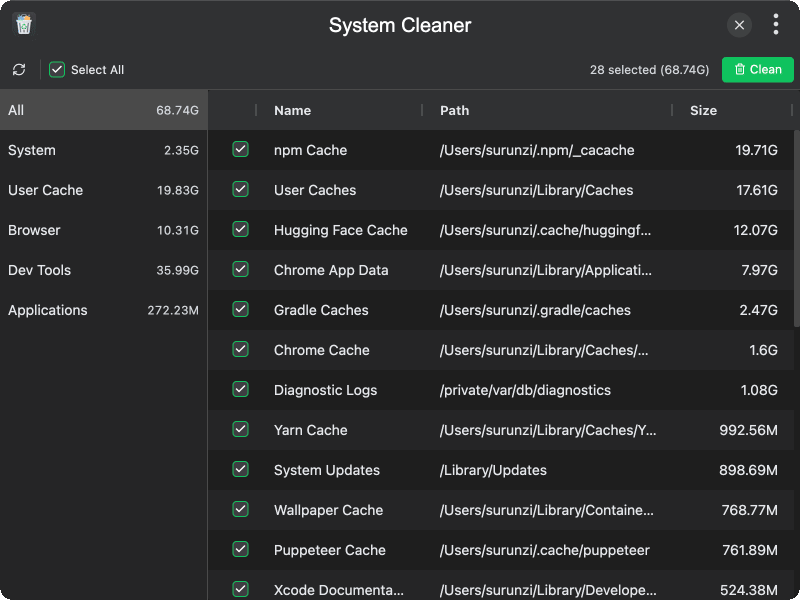
- Category-based scanning — organizes junk files into categories: System, User Cache, Browser, Dev Tools, and Applications
- Comprehensive rule coverage — detects system temp files, logs, crash reports, browser caches, npm/Yarn/pip/Cargo caches, VS Code caches, and more
- Size analysis — displays the size of each detected junk item and total size per category
- Selective cleaning — choose individual items or select all for batch cleaning
- Move to Trash option — safely move files to Trash instead of permanent deletion
- Scan progress — real-time progress display during scanning with current path information
- Confirmation dialog — confirms before cleaning with a summary of selected items and total size
Usage
- The plugin automatically starts scanning when opened
- After scanning, review the detected junk files organized by category
- Use the sidebar to filter by category (All, System, User Cache, Browser, Dev Tools, Applications)
- Select or deselect items you want to clean, or use Select All
- Toggle Move to Trash if you want files moved to Trash instead of being permanently deleted
- Click Clean to start cleaning the selected items
- Confirm the operation in the confirmation dialog
- Click Scan to rescan the system at any time