
tinker-password-manager
A password manager plugin for TINKER, powered by the KeePass (KDBX) format for secure password storage and management.
Features
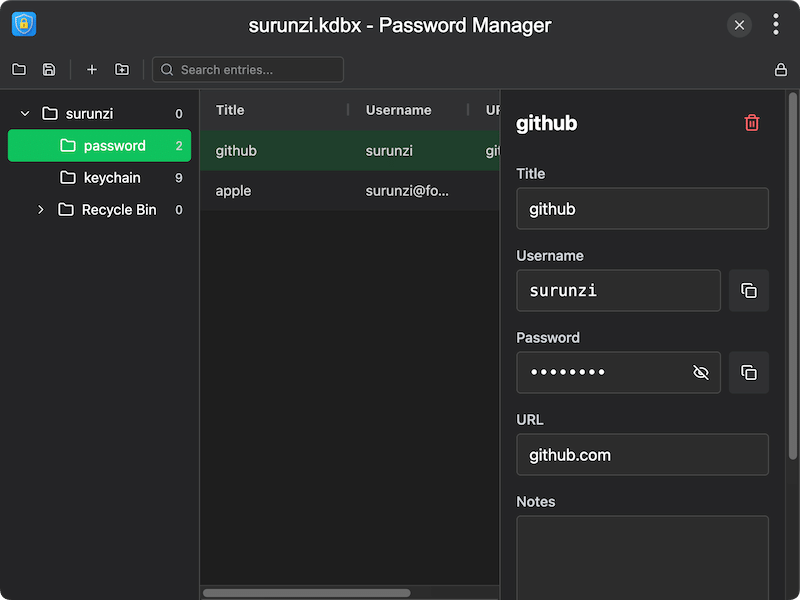
- KeePass compatible — create, open, and save KDBX database files compatible with KeePass
- Group management — organize entries into hierarchical groups with create, rename, and delete operations
- Entry management — store title, username, password, URL, notes, and custom fields for each entry
- Search — quickly search across all entries by title, username, URL, or notes
- Password visibility — toggle password display with show/hide
- Copy to clipboard — one-click copy username or password
- Key file support — open databases using password with optional key file
- Recent files — quick access to recently opened database files
- Database lock — lock the database to protect data when stepping away
Usage
- Click New Database to create a new password database, or Open Database to load an existing KDBX file
- Enter the master password (and optional key file) to unlock the database
- Use the group tree on the left to organize entries into categories
- Click Create Entry to add a new password entry, filling in title, username, password, URL, and notes
- Select an entry to view or edit its details in the right panel
- Use the Search bar to quickly find entries across all groups
- Click Save to persist changes to the database file