
tinker-code-editor
A lightweight code editor plugin for TINKER, with syntax highlighting, multi-tab support, and an integrated terminal.
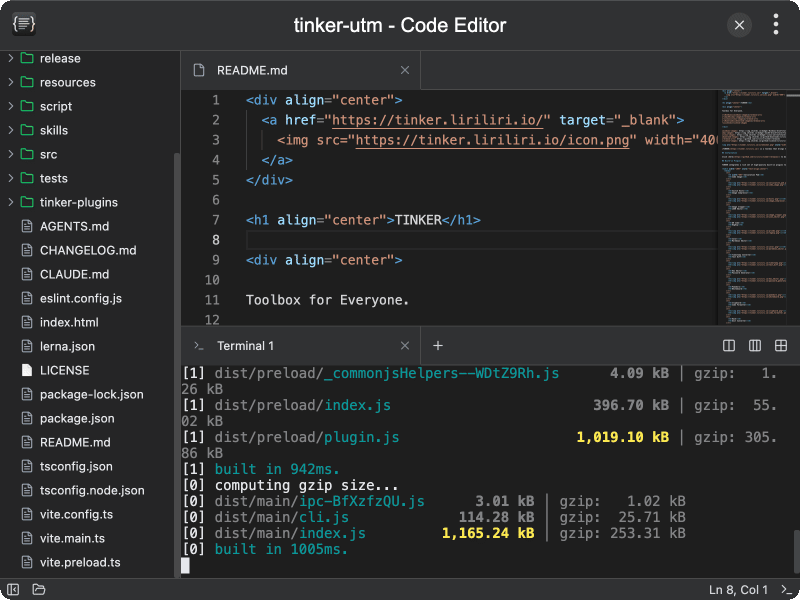
Features
- Syntax highlighting — language-aware code editing powered by CodeMirror
- Multi-tab editing — open multiple files in tabs, with drag-to-reorder support
- File tree sidebar — browse and open files from a project directory
- Dirty state tracking — unsaved changes are indicated on each tab
- Integrated terminal — toggle a built-in terminal panel with multiple tabs and split panes
- Split terminal panes — split the terminal horizontally or vertically, with preset layouts (dual columns, triple columns, grid)
- Save files — save edited files back to disk
- Cursor position — status bar displays the current line and column
- Persistent state — remembers the last opened folder, sidebar, and terminal visibility
Usage
- Click Open Folder to select a project directory
- Browse the file tree in the sidebar and click a file to open it in a new tab
- Edit code in the editor — unsaved changes are marked on the tab
- Press Ctrl+S (or use the save action) to write changes back to disk
- Toggle the integrated terminal from the toolbar to run commands within the project
- Use split pane options in the terminal for parallel command execution