
tinker-image-annotator
An image annotation plugin for TINKER, providing drawing, shape, text, and markup tools for images.
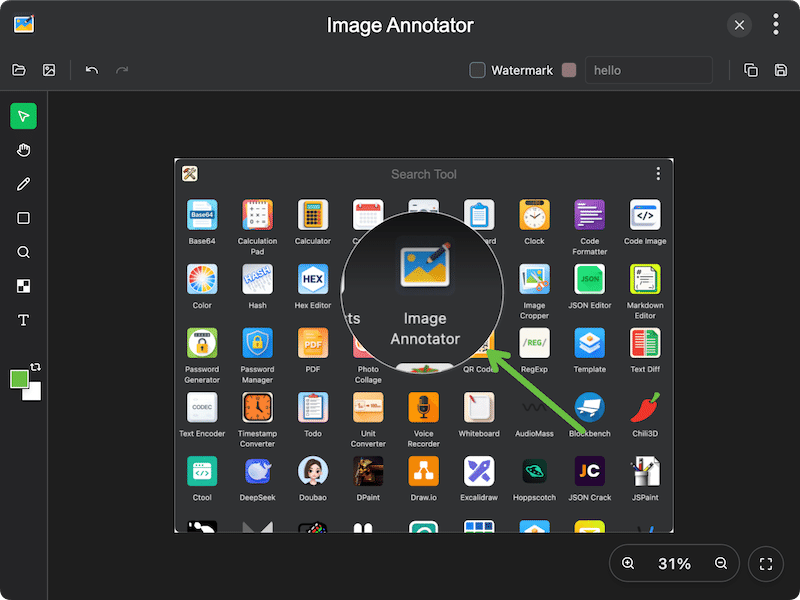
Features
- Drawing tools — select, move, freehand pen, shapes (rectangle, ellipse, line, arrow), text, magnifier, and mosaic
- Shape annotations — draw rectangles, ellipses, lines, and arrows with configurable stroke width
- Text annotations — add editable text with adjustable font size
- Mosaic tool — pixelate areas of an image to obscure sensitive information
- Magnifier tool — magnify areas for detail emphasis
- Image overlay — insert additional images on top of the canvas
- Screen capture — capture the screen directly and annotate
- Clipboard support — paste images from clipboard, copy annotated result
- Watermark — add customizable text watermark with configurable color
- Color picker — foreground and background color selection with swap support
- Undo/Redo — full undo and redo support for annotation changes
- Zoom controls — zoom in, zoom out, and fit to view
- Export — save annotated images in PNG, JPG, or WebP format
Usage
- Click Open to load an image, or capture the screen, or paste from clipboard
- Select a drawing tool from the side toolbar (pen, shape, text, magnifier, mosaic, etc.)
- Draw annotations on the image canvas
- Adjust stroke width, font size, or shape type in the top toolbar as needed
- Optionally enable Watermark and customize the text and color
- Click Copy to copy the result to clipboard, or Save to download the annotated image