
tinker-mind-map
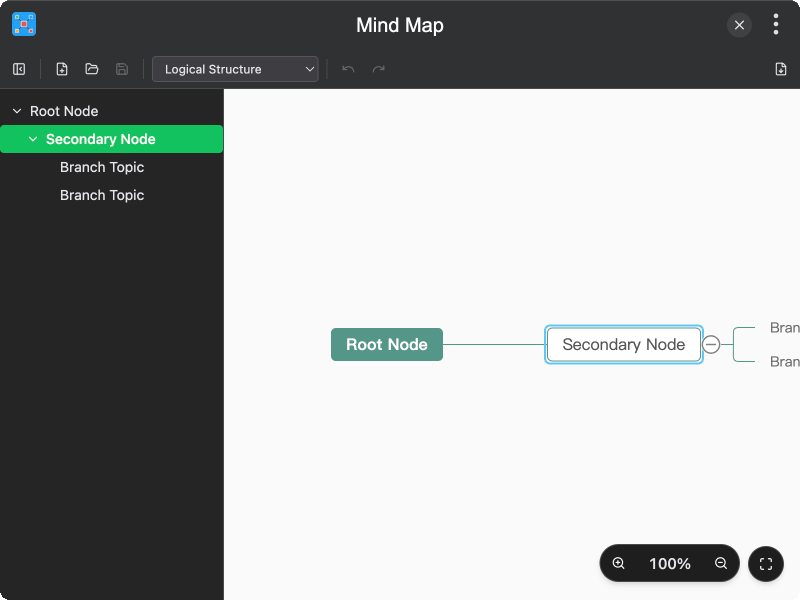
A mind map plugin for TINKER, allowing you to create, edit, and organize mind maps with multiple layout options.
Features
- Multiple layouts — switch between Logical Structure, Mind Map, Organization Structure, and Catalog Organization
- Outline sidebar — view and navigate nodes in a tree-structured outline panel
- Node operations — insert child/sibling nodes, move, copy, cut, paste, and delete nodes via context menu
- File operations — create new mind maps, open existing files (JSON/SMM), and save changes
- Undo/Redo — full undo and redo support for all editing actions
- Zoom controls — zoom in/out with preset values, or fit the entire map to the canvas
- Export image — export the mind map as a PNG image
- Keyboard navigation — navigate and edit nodes using keyboard shortcuts
- Hyperlinks and notes — attach hyperlinks and notes to nodes
Usage
- Launch the plugin to see a default mind map with a root node and sample branches
- Double-click a node to edit its text
- Right-click a node to access the context menu for inserting, moving, copying, or deleting nodes
- Use the layout selector in the toolbar to switch between different layout styles
- Toggle the sidebar to view the outline and quickly navigate to any node
- Click Save to save your mind map to a file, or Open to load an existing one
- Use the zoom controls in the bottom-right corner to adjust the view, or click Fit to fit the map to the canvas
- Click Export Image to download the mind map as a PNG file