
tinker-todo
A todo list plugin for TINKER, using the todo.txt format for plain-text task management.
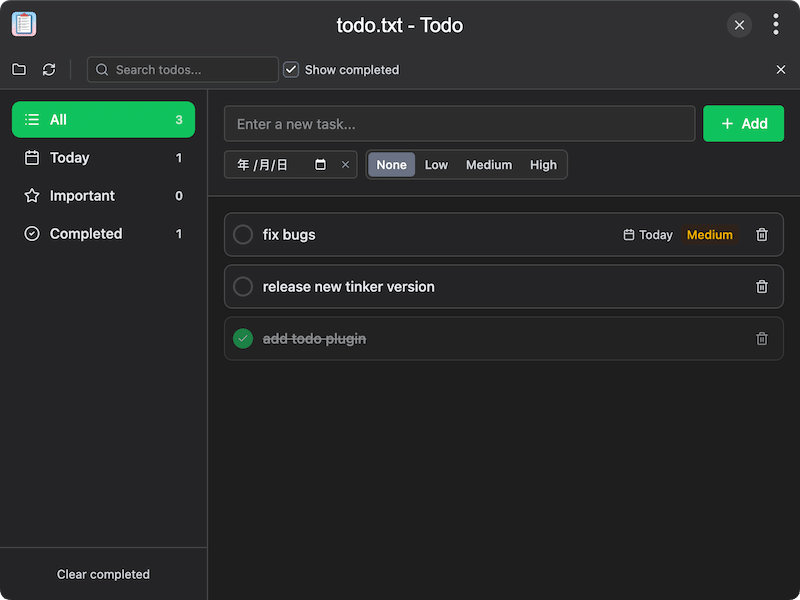
Features
- Todo.txt format — stores tasks in the standard todo.txt plain-text format for portability
- Open or create files — open an existing todo.txt file or create a new one, with recent files list
- Add tasks — quickly add new tasks with optional priority and due date
- Priority levels — assign High (A), Medium (B), Low (C), or no priority to tasks
- Due dates — set due dates on tasks for time-based filtering
- Filter views — filter tasks by All, Today, Important (priority A), or Completed
- Search — search through tasks by text to quickly find items
- Edit tasks — edit task text, priority, and due date inline
- Complete/uncomplete — toggle task completion with automatic completion date tracking
- Show/hide completed — toggle visibility of completed tasks
- Clear completed — remove all completed tasks at once
- Reload & show in folder — reload the file from disk or reveal it in the file manager
- State persistence — filter, show-completed preference, and file path are saved automatically
Usage
- On first launch, click Open File to open an existing todo.txt file, or Create File to start a new one
- Type a task in the input field and click Add to create it
- Set a priority (High/Medium/Low) and optional due date when adding or editing a task
- Use the sidebar filters (All, Today, Important, Completed) to focus on specific tasks
- Click a task's checkbox to mark it as completed
- Click Edit on a task to modify its text, priority, or due date
- Use the search bar to find tasks by keyword
- Click Clear completed to remove all finished tasks