
tinker-pie-menu
A floating pie menu plugin for TINKER that provides radial actions via an always-on ball or middle-click invoke.
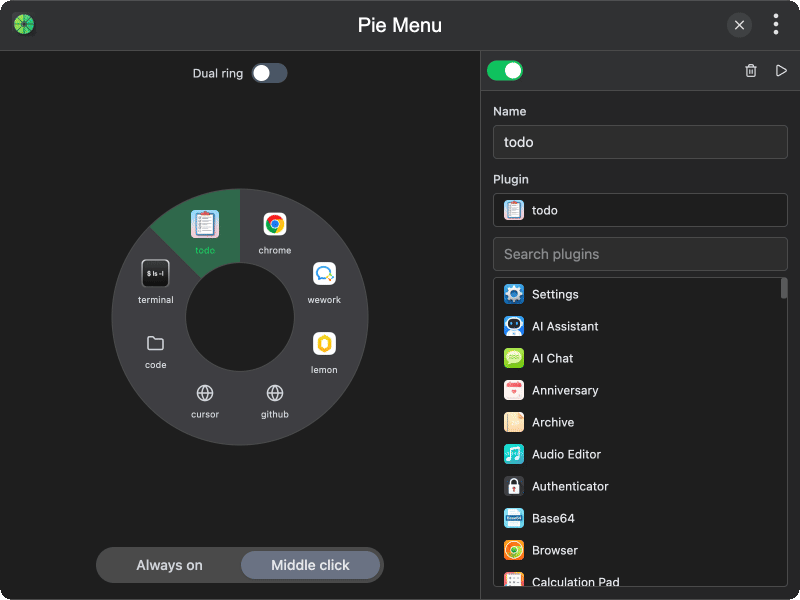
Features
- Radial pie menu — arrange actions in an 8-sector circular menu for quick access
- Always-on ball — keep a floating ball on screen; click it to expand the pie menu
- Middle-click invoke — long-press the middle mouse button to show the pie menu at the cursor
- Dual ring — optionally enable an outer ring with 16 sectors (2 per inner sector)
- Multiple action types — run a shell command, open an application, open a directory, visit a URL, or launch a TINKER plugin
- Enable / disable — toggle individual sectors on or off without clearing them
- Quick run — execute a selected sector action immediately from the config panel
Usage
- Click a sector on the pie preview to select it, then choose an action type (command, application, directory, URL, or plugin)
- Configure the action name and target in the panel on the right
- Toggle Dual ring to add an outer ring with additional sectors
- Choose Always on to keep a floating ball on screen, or Middle click to invoke the menu by long-pressing the middle mouse button
- In always-on mode, click the floating ball to expand the menu, then click a sector to run its action
- In middle-click mode, long-press the middle mouse button to show the menu at the cursor and select a sector