
tinker-large-file
A large file cleaner plugin for TINKER that scans directories to find large files (10 MB+) and helps you delete them to free up disk space.
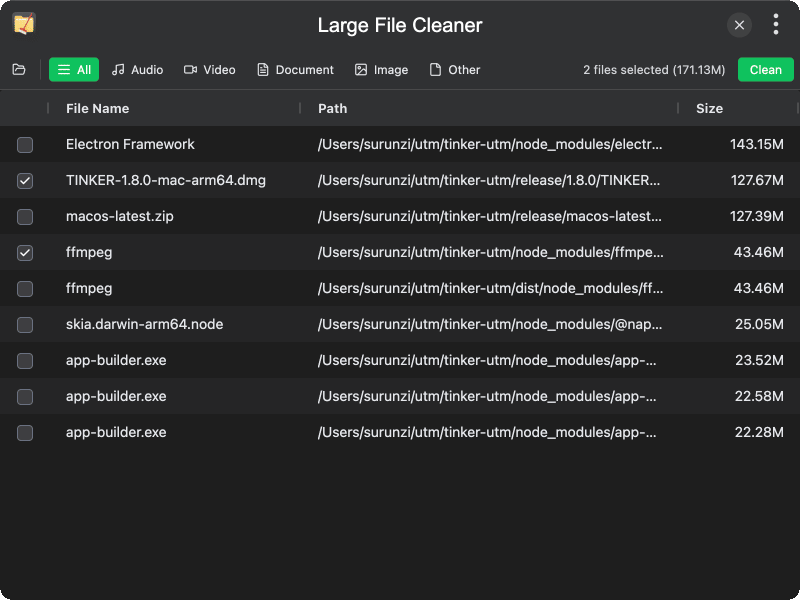
Features
- Folder scanning — select any folder or drag-and-drop to scan for large files recursively
- Minimum size threshold — automatically identifies files 10 MB or larger
- File type filtering — filter results by category: Audio, Video, Document, Image, or Other
- Sortable results grid — displays file name, path, and size in a clear data grid
- Batch selection — select multiple files with checkboxes for bulk deletion
- Selection summary — real-time display of selected file count and total size
- Deletion with confirmation — confirm before cleaning, with success/error feedback
- Show in folder — click a file path to reveal it in the system file manager
- Scan progress — real-time display of scanned file count and total size during scanning
- Cancel scan — abort a running scan at any time
Usage
- Click the "Open Folder" button or drag a folder into the window to start scanning
- Wait for the scan to complete — progress is shown in real time
- Browse the results list showing all files 10 MB or larger, sorted by size
- Use the filter tabs (All, Audio, Video, Document, Image, Other) to narrow results
- Check the files you want to delete using the checkboxes
- Click the "Clean" button and confirm the deletion in the dialog