
tinker-image-compressor
An image compression plugin for TINKER, supporting batch compression of PNG, JPG, and WebP images.
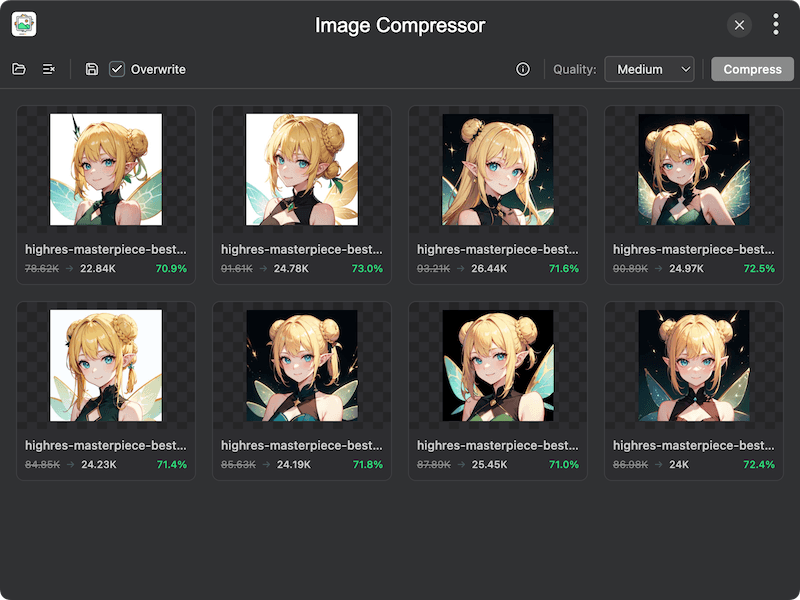
Features
- Batch compression — compress multiple images at once
- Format support — supports PNG, JPG, and WebP formats
- Adjustable quality — quality slider from 1 to 100 with preset levels (Very Low, Low, Medium, High, Excellent)
- Before/after comparison — visual side-by-side comparison of original and compressed images
- EXIF preservation — optionally keep EXIF metadata during compression
- Overwrite or save separately — choose to overwrite original files or save compressed images to a new directory
- Size statistics — view original size, compressed size, and compression ratio for each image
- Clipboard support — copy compressed images to clipboard
Usage
- Click Open or drag and drop images into the plugin to add them
- Adjust the Quality slider to set the desired compression level
- Optionally toggle Keep EXIF to preserve image metadata
- Click Compress to compress all images
- Click the compare button on any image to see a before/after comparison
- Click Save to save all compressed images — choose to overwrite originals or save to a new directory