
tinker-renamer
A batch file renaming tool for TINKER, supporting multiple renaming rules with real-time preview.
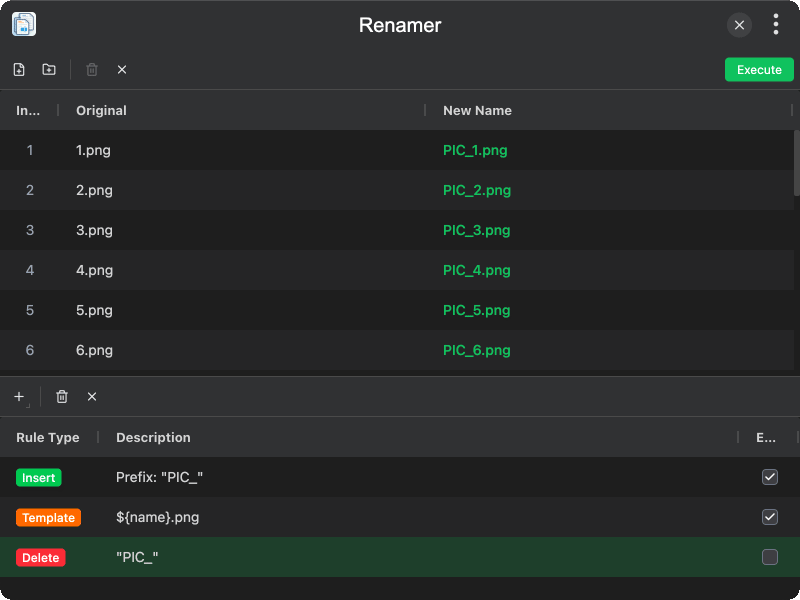
Features
- Batch file renaming — rename multiple files at once with a real-time preview of the new names
- Add files or folders — add individual files or all files in a folder to the rename list
- Replace rule — find and replace text in file names, with support for regular expressions, case sensitivity, and match-all options
- Insert rule — add a prefix or suffix to file names
- Delete rule — remove matching text from file names, with regex and case sensitivity options
- Format rule — change file name casing: UPPERCASE, lowercase, Capitalize Each Word, kebab-case, snake_case, camelCase, or Upper first
- Template rule — use JavaScript template expressions with variables like
${name},${ext},${index}for advanced renaming - Rule management — add, edit, reorder, enable/disable, and delete rules; rules are applied in order and saved automatically
- Include extension option — choose whether replacement rules apply to the file extension as well
Usage
- Click Add Files or Add Folder to add files to the list
- Click Add Rule to create a renaming rule (Replace, Insert, Delete, Format, or Template)
- Configure the rule options and click Save
- The New Name column shows a real-time preview of the renamed files
- Add more rules as needed — they are applied in order from top to bottom
- Toggle rules on or off, reorder them, or edit them at any time
- Click Execute to perform the rename operation