
tinker-image-cropper
An image cropping plugin for TINKER, with rotation, flipping, resizing, and aspect ratio controls.
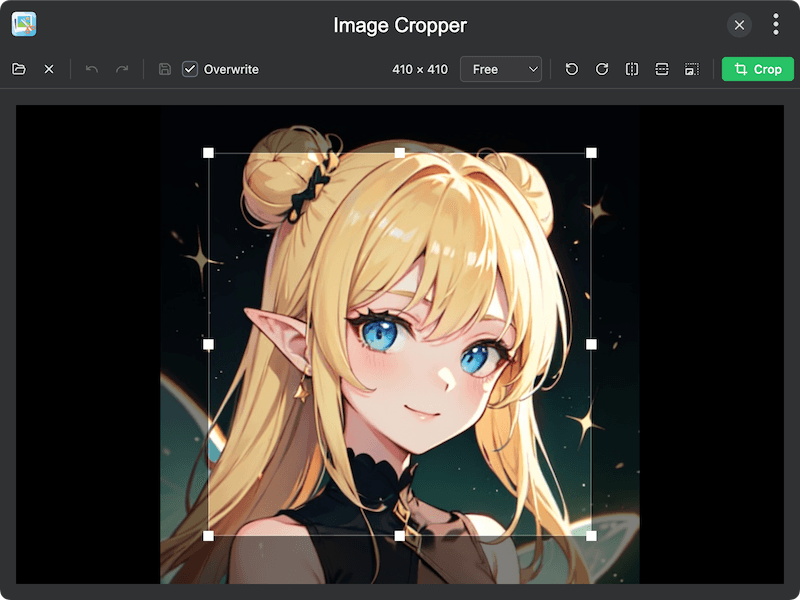
Features
- Interactive cropping — drag to select a crop area with real-time preview
- Aspect ratio presets — Free, Original, 1:1, 4:3, 3:2, 16:9
- Custom crop size — set exact crop dimensions in pixels
- Rotate — rotate the image left or right by 90 degrees
- Flip — flip the image horizontally or vertically
- Resize — resize the image to specific dimensions with optional aspect ratio lock
- Screen capture — capture the screen directly and crop
- Clipboard support — paste images from clipboard, copy cropped result
- Undo/Redo — full history support for crop operations
- Save options — overwrite the original file or save as a new file
Usage
- Click Open to load an image, capture the screen, or paste from clipboard
- Drag on the image to define the crop area
- Optionally select an Aspect Ratio preset or set a custom crop size
- Use rotate, flip, or resize controls as needed
- Click Crop to apply the crop
- Click Copy to copy the result to clipboard, or Save to save the cropped image