
tinker-http-request
An HTTP request testing plugin for TINKER, similar to Postman, for sending and inspecting HTTP requests.
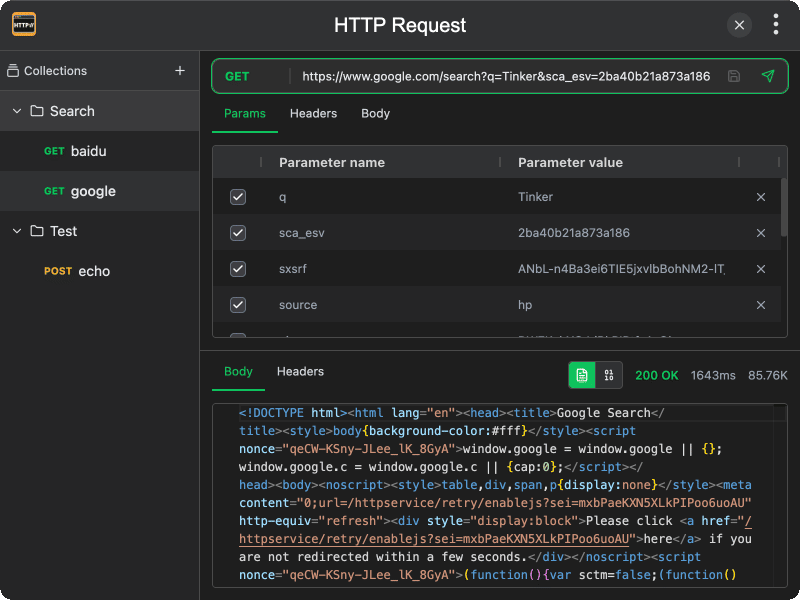
Features
- Multiple HTTP methods — support for GET, POST, PUT, PATCH, DELETE, HEAD, and OPTIONS
- Request parameters — edit query parameters with a key-value editor, auto-synced with the URL
- Custom headers — add and manage request headers
- Request body — support for JSON, URL-encoded form data, and plain text body types
- Authentication — built-in support for Basic Auth and Bearer Token
- Response viewer — view response body in text or hex mode, with status code, duration, and size
- Response headers — inspect response headers in a table view
- Collections — organize requests into collections and folders for easy management
- Auto save — changes to collection requests are automatically saved when switching
Usage
- Select an HTTP method from the dropdown (GET, POST, etc.)
- Enter the request URL in the address bar
- Optionally configure parameters, headers, body, or authentication in the request panel tabs
- Click the Send button or press Enter to send the request
- View the response body, status code, duration, and headers in the response panel
Collections
- Click New Collection in the sidebar to create a collection
- Right-click a collection or folder to add requests or sub-folders
- Click a saved request to load it into the editor
- Changes are auto-saved when switching between requests