
tinker-disk-usage
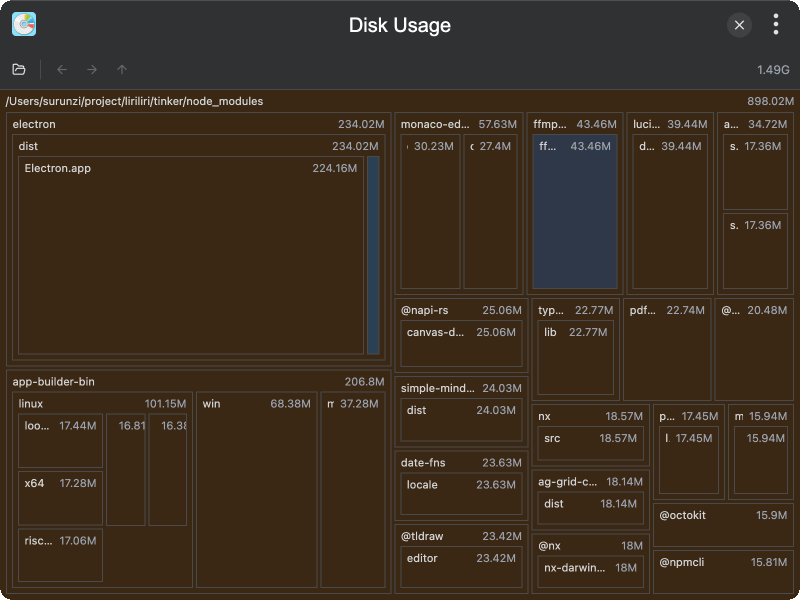
A disk usage analyzer plugin for TINKER that visualizes storage consumption with an interactive treemap to help identify space-hogging files and directories.
Features
- Folder scanning — select any folder to analyze its disk usage with configurable scan depth
- Interactive treemap — D3-based visualization with boxes sized proportionally to disk usage
- Color-coded file types — different colors for JS/TS, JSON, CSS, HTML, images, markdown, directories, and more
- Drill-down navigation — single-click to expand a directory, double-click to navigate into it
- Back/Forward/Up navigation — browser-like history for easy exploration
- Lazy loading — deeply nested directories are loaded on-demand for performance
- Context menu actions — right-click to show in file manager or delete files/folders
- Scan progress — real-time display of file count, total size, and error count during scanning
- Rescan — refresh disk usage data for the current directory
- Dark/Light theme support — adapts visualization colors to the current theme
Usage
- Click the "Open Folder" button to select a directory for analysis
- Wait for the scan to complete — progress is shown in real time
- Explore the treemap: larger boxes represent bigger files or directories
- Single-click a directory to expand it, double-click to drill into it
- Use the back, forward, and up buttons in the toolbar to navigate
- Right-click any item to show it in the file manager or delete it