
tinker-chinese-chess
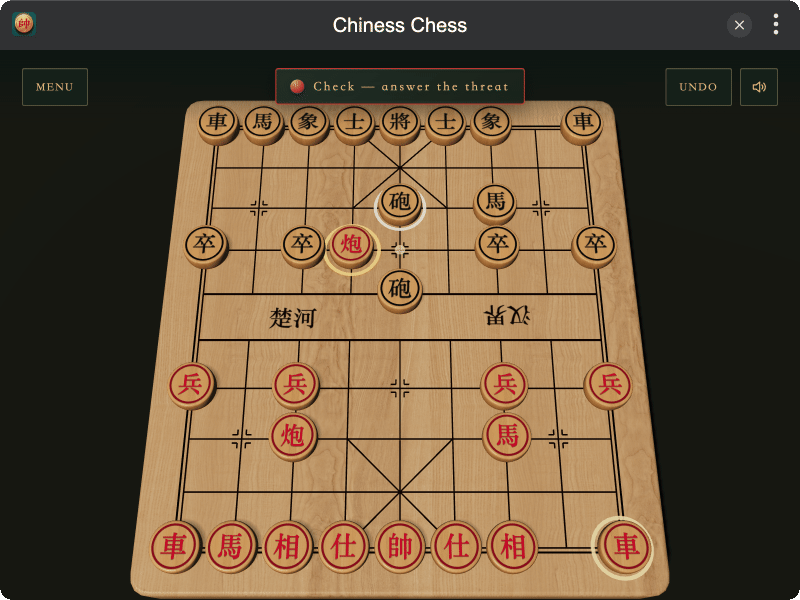
A polished 3D Chinese chess game for TINKER, built with Three.js.
Highlights
- Classic Xiangqi rules — play on a standard 9×10 board with palaces, river lines, flying generals, check, checkmate, and stalemate
- Play your way — local two-player mode or a computer opponent with Beginner, Steady, and Master difficulty
- Thoughtful computer opponent — opening gambit book, alpha-beta search, iterative deepening, and move ordering
- Tactile 3D board — wood-textured board and pieces, subtle drop animations, contact shadows, and orbit controls
- Flexible controls — mouse, touch, keyboard, WASD, and gamepad support with move and capture sound effects
Installation
Play directly in browser, or install via TINKER: download from https://tinker.liriliri.io/, then run npm i -g tinker-chinese-chess.
How to Play
- Choose local two-player mode or play against the computer, then select a difficulty.
- Click a piece to see its legal moves, then click a highlighted position to move.
- Use the arrow keys, WASD, or a gamepad to move the cursor and confirm with Space or Enter.
- Drag the board to rotate the view, or use the right mouse button to pan.