
tinker-float
A float window plugin for TINKER that displays webpages, images, videos, and text in an always-on-top overlay.
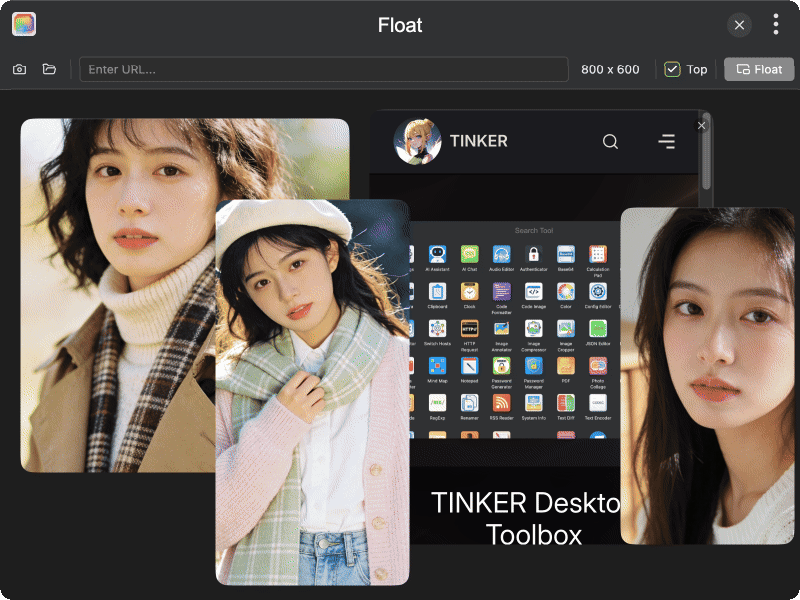
Features
- Webpage display — enter a URL to load and display any webpage in a floating window
- Image preview — open image files (PNG, JPG, GIF, WebP, BMP, SVG) or paste image URLs for floating display
- Video playback — play video files (MP4, WebM, MOV, AVI, MKV, etc.) in the float window
- Text display — open text files (TXT, MD, JSON, JS, TS, HTML, CSS, and more) for floating reference
- Screen capture — capture the current screen and display it in the float window
- Always on top — keep the float window above all other windows for easy reference
- Custom window size — adjust the width and height of the float window
- Auto aspect ratio — image float windows automatically maintain the correct aspect ratio
Usage
- Click the camera icon to capture the screen, or click the folder icon to open a file
- Alternatively, enter a URL in the address bar and press Enter to load a webpage
- Adjust the window size by clicking the dimension display (e.g., "400 x 300")
- Toggle the Top checkbox to control whether the float window stays on top
- Click the Float button to launch the floating window
- Press Esc to close the float window