
tinker-coding-agent
A GUI coding agent plugin for TINKER, for inspecting and editing code in a local workspace.
Features
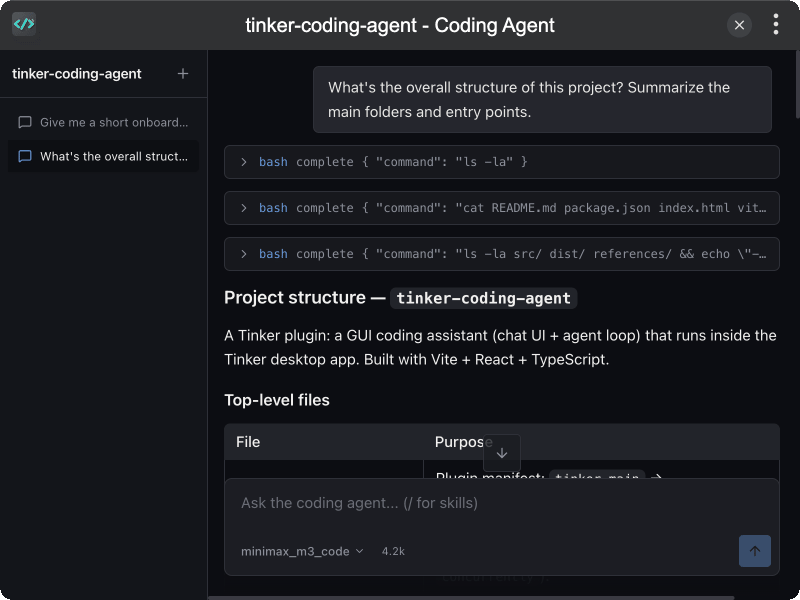
- Workspace chat for exploring and editing a local project folder
- Coding tools to read, write, edit files, and run shell commands
- Model picker using AI providers already configured in Tinker
- Agent skills via
/slash commands from~/.agents/skillsand project skills - Multi-session sidebar with recent workspaces
- Streaming replies with tool call details and context token usage
- i18n support for English and Chinese
Installation
Download and install TINKER, then run:
bash
npm i -g tinker-coding-agentUsage
- Click Open Workspace and choose a project folder
- Select an AI provider and model configured in Tinker
- Ask the agent to inspect or edit code in the workspace
- Type
/in the composer to browse and insert skills - Use the sidebar to switch sessions or open a recent workspace
Example Queries
What's the overall structure of this project? Summarize the main folders and entry points.What does this app do, and who is it for?Explain the architecture at a high level — main modules and how they talk to each other.Where does the app start, and what happens on startup?Trace the request/response flow for the main user action.How is state managed in this codebase?Where is configuration loaded, and what options matter most?How are errors handled and surfaced to the user?What are the key data models / types, and how do they relate?How does data get from the UI to storage (or the API)?What external services or APIs does this project depend on?Find the most important files for understanding the core logic, and explain each briefly.What conventions should a new contributor follow in this codebase?Give me a short onboarding guide: what to read first, second, and third.