
tinker-svg-editor
An SVG editor plugin for TINKER, powered by @svgedit/svgcanvas.
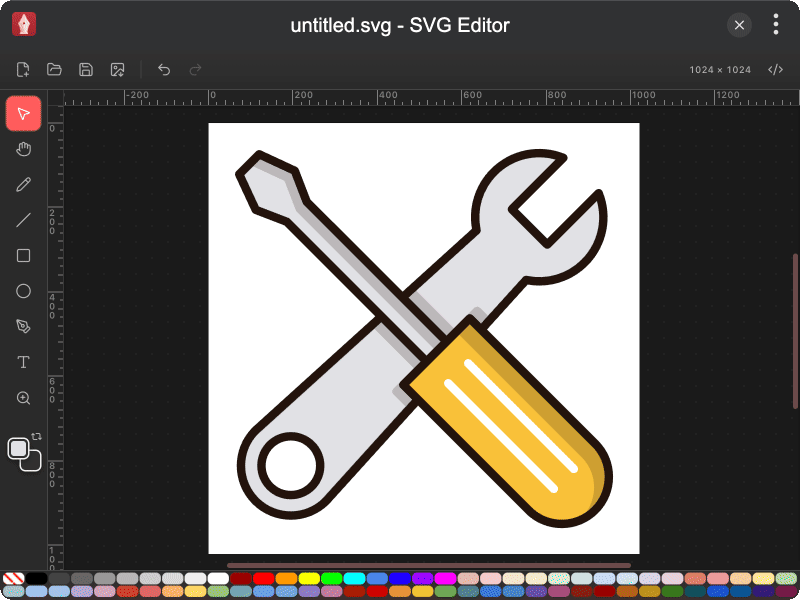
Features
- Drawing tools — select, pan, pencil, line, rectangle, ellipse, path, text, and zoom
- Fill & stroke with color chips, swap, and a bottom palette
- Canvas size editing from the toolbar
- Element editing for stroke width, rectangle roundness, and text style
- Arrange via context menu — align, bring forward / send backward, group / ungroup
- Undo / redo and cut / copy / paste / duplicate
- Open & save SVG files, export PNG, and edit raw SVG source
Installation
Play directly in browser, or install via TINKER:
bash
npm i -g tinker-svg-editorUsage
- Use the left toolbar to pick a drawing tool, or press shortcuts such as
V(select),H(pan),R(rect),O(ellipse) - Click the fill / stroke chips or the palette to set colors (Shift-click a palette swatch for stroke)
- Click the canvas size label in the toolbar to resize the document
- Right-click selected elements to align, reorder, group, or ungroup
- Use Open / Save for SVG files, Export PNG for a raster copy, or Source to edit the SVG markup