
tinker-photo-viewer
A photo viewer plugin for TINKER that lets you browse photos from local directories, organized by date in a masonry layout, with full EXIF metadata inspection.
Features
- Masonry gallery — browse photos in a responsive masonry grid, organized by date sections
- Photo viewer — view photos full-size with previous/next navigation and smooth transitions
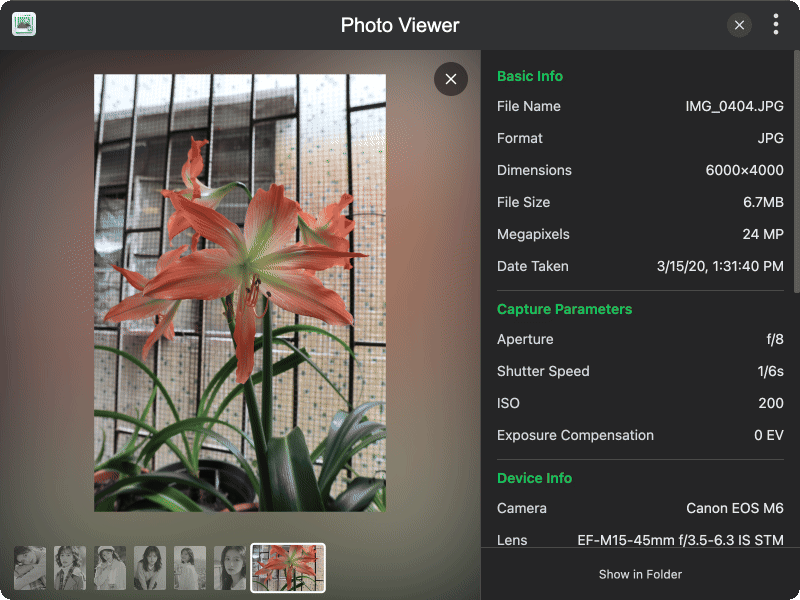
- EXIF metadata — inspect detailed EXIF data including camera info, capture parameters, GPS location, and technical parameters
- Folder scanning — scan selected local directories to automatically import and keep photos in sync
- File import — manually import photos via file dialog with multi-selection support
- Search — quickly find photos by file name across your system
- Show in folder — open the file's location in your system file manager
Usage
- Click the Import button to manually add photos, or Scan Folders to import entire directories
- Photos appear in a masonry layout grouped by date
- Click any photo to open it in the full-screen viewer
- Use arrow keys or navigation buttons to browse between photos
- The right panel displays EXIF metadata for the current photo, including camera, lens, exposure settings, and GPS location
- Click Show in Folder to locate the original file on disk