
tinker-agent-pet
A desktop pet plugin for TINKER, powered by Petdex. Browse, install, and run animated companions on your desktop.
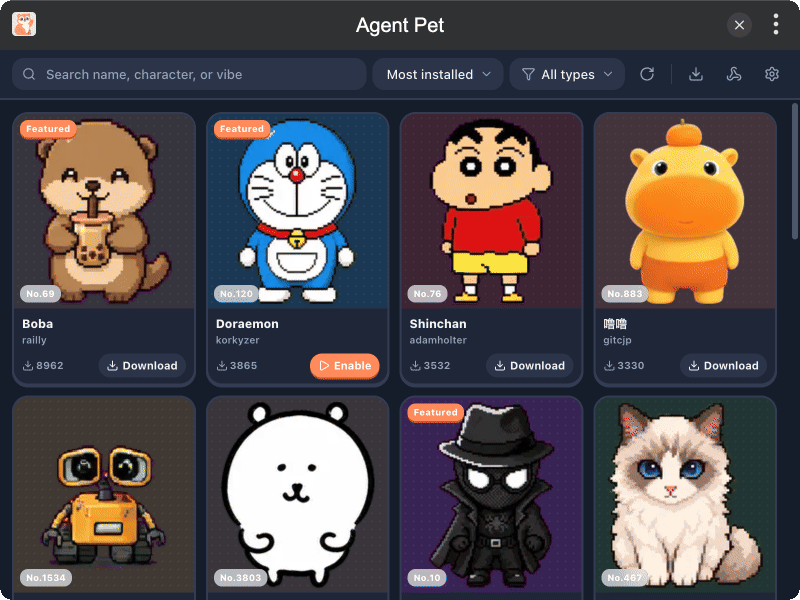
Features
- Petdex Gallery — search, filter, and browse pets by popularity, recency, or type
- Local Install — download pet packs and manage installed companions
- Desktop Pet — always-on-top floating window with drag, click actions, scale, and opacity
- Agent Hooks — trigger pet animations from CodeBuddy, Claude, Codex, Cursor, and more
- MCP Tools —
play_action,list_actions, andget_statusfor agents and the CLI - Background Mode — keep the pet running with Tinker Run in Background / Run at Startup
Installation
Download and install TINKER, then run:
bash
npm i -g tinker-agent-petUsage
- Browse the gallery and download a pet you like
- Click Enable to open the desktop companion
- Drag to move; click to cycle animations; adjust size and opacity in Settings
- Open Agent Hooks to map coding-agent events to pet actions, then Apply
- Optionally enable Run in Background and Run at Startup so the pet restores on launch
MCP
With the plugin running:
bash
tinker call tinker-agent-pet --tool list_actions
tinker call tinker-agent-pet --tool play_action --args '{"action":"waving"}'
tinker call tinker-agent-pet --tool play_action --args '{"action":"running","loop":true}'
tinker call tinker-agent-pet --tool get_status