
tinker-rss-reader
An RSS/Atom feed reader plugin for TINKER, allowing you to subscribe to feeds, browse articles, and read content in one place.
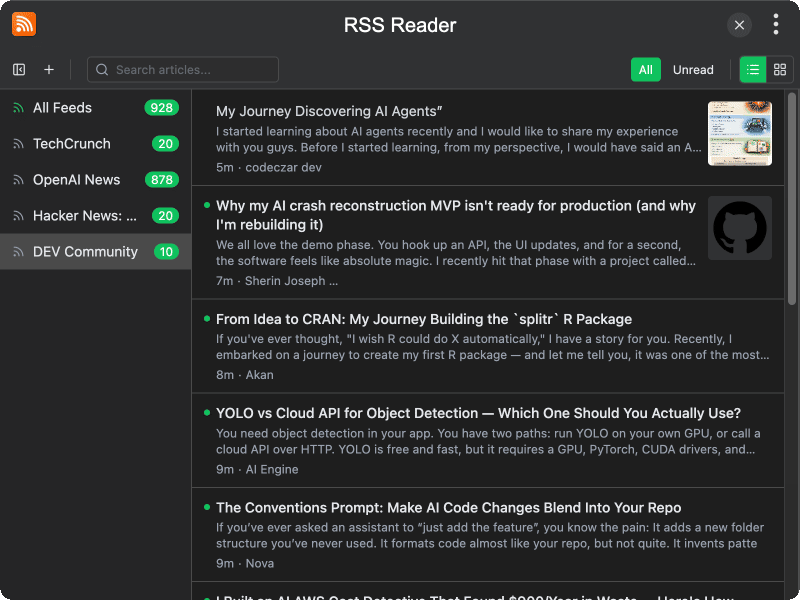
Features
- Feed subscription — add RSS/Atom feeds by URL and manage multiple sources
- Article list — browse articles sorted by date with title, snippet, and thumbnail preview
- Read/unread tracking — articles are automatically marked as read when opened, with unread counts per source
- Article detail view — read article content directly within the plugin with formatted HTML rendering
- Load full content — fetch the full article content from the original page when the feed only provides a summary
- Search articles — search through article titles and snippets to quickly find content
- Filter by status — filter articles to show all or only unread items
- List and card views — switch between list view and card view for browsing articles
- Mark all read — mark all articles in the current feed or across all feeds as read
- Open in browser — open articles in your default browser for the full web experience
- Collapsible sidebar — toggle the feed source sidebar to maximize reading space
- Auto refresh — refresh individual feeds or all feeds at once to check for new articles
Usage
- Click the + button to add a new RSS/Atom feed URL
- Select a feed source in the sidebar to view its articles, or choose All Feeds to see everything
- Click an article to read its content in the detail panel
- Use the Unread filter to focus on new articles only
- Click Load Full Content if the feed only shows a summary
- Use the search bar to find articles by title or content
- Click Mark All Read to clear unread counts
- Switch between List View and Card View using the toolbar buttons