
tinker-text-diff
A text comparison tool for TINKER, providing side-by-side editing and diff viewing with syntax highlighting.
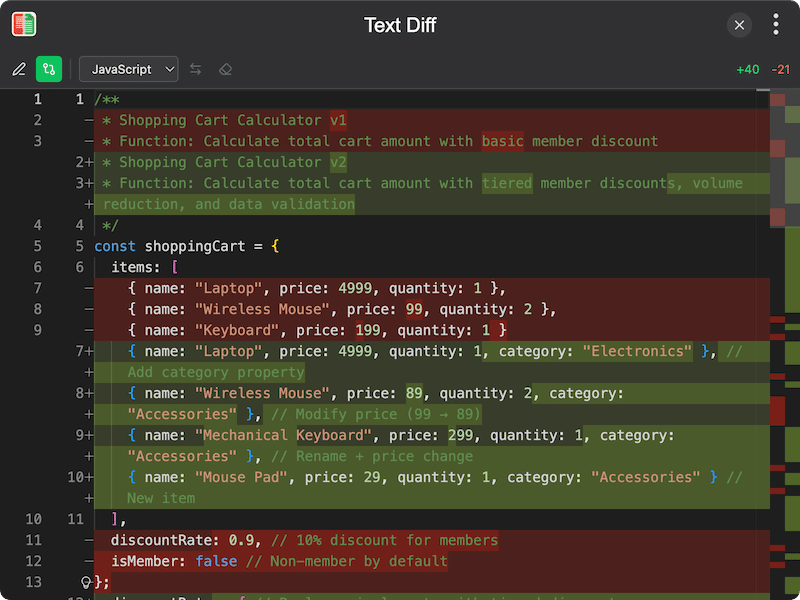
Features
- Edit mode — enter original and modified text in a side-by-side dual editor
- Diff mode — view a highlighted diff showing additions and deletions between the two texts
- Syntax highlighting — select a programming language for syntax-aware highlighting in both editors
- Language auto-detection — automatically detects the language when opening files
- Open files — load text from files into either the original or modified editor
- Swap texts — swap the original and modified texts with one click
- Clipboard support — paste text from clipboard into either editor, or copy content to clipboard
- Undo/redo — full undo and redo support in the editors
- Diff statistics — view the number of additions and deletions in diff mode
- State persistence — text content, view mode, and language selection are automatically saved and restored
Usage
- Switch to Edit Mode and enter or paste text into the Original and Modified panels
- Optionally click Open file to load text from a file
- Select a programming language from the language selector for syntax highlighting
- Switch to Diff Mode to see a highlighted comparison of the two texts
- Use the Swap button to swap original and modified texts
- Click Clear to reset both editors