
tinker-photo-develop
A professional photo development plugin for TINKER with real-time WebGL-powered adjustments, including exposure, tone, color, curves, effects, and details controls.
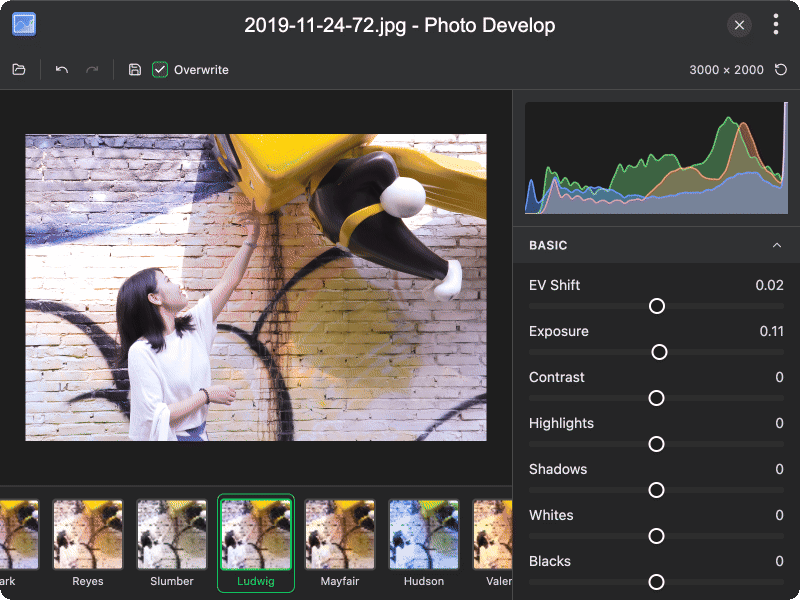
Features
- Basic adjustments — control exposure, brightness, contrast, highlights, shadows, whites, and blacks with real-time preview
- Curves — fine-tune tonal range with Luma, Red, Green, and Blue curve channels
- Color adjustments — adjust temperature, tint, vibrance, and saturation
- Color mixer — precisely control hue and luminance for 8 color channels (Reds, Oranges, Yellows, Greens, Aquas, Blues, Purples, Magentas)
- Effects — add vignette with adjustable amount, midpoint, roundness, and feather; apply film grain with size and roughness controls
- Details — sharpen images with adjustable threshold; reduce luminance and color noise
- Filters — apply 15+ preset filters with live thumbnail previews, including Sepia, Clarendon, Lo-Fi, Lark, X-Pro II, and more
- Histogram — real-time histogram visualization for exposure analysis
- Undo/redo — full adjustment history with debounced commit and undo/redo support
- EXIF preservation — preserves original EXIF metadata when saving JPEG files
- Drag & drop — drag and drop images directly onto the editor
Usage
- Click Open Image to select a photo, or drag and drop an image onto the editor
- Adjust the image using the sliders in the left panel, organized into sections: Basic, Curves, Color, Color Mixer, Effects, and Details
- Browse the Filters tab to apply preset filters with live previews
- Use Undo / Redo to navigate your adjustment history
- The histogram in the top-right corner shows real-time exposure distribution
- Click Save Image to export the edited image in PNG, JPG, or WebP format
- Enable Overwrite to save directly to the original file