
tinker-hotkeys
A global hotkey manager plugin for TINKER, allowing you to bind keyboard shortcuts to custom actions.
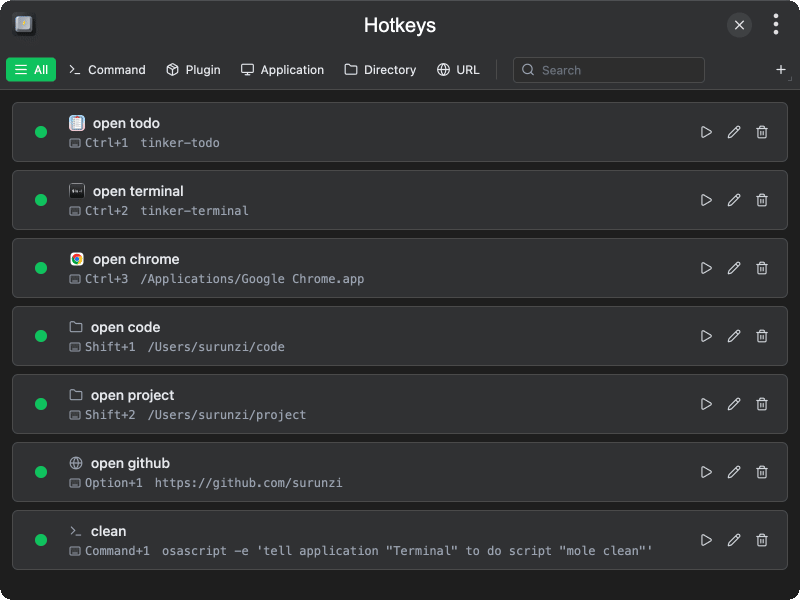
Features
- Global hotkeys — register system-wide shortcuts that work even when TINKER is in the background
- Multiple action types — run a shell command, open an application, open a directory, visit a URL, or launch a TINKER plugin
- Hotkey recording — click the hotkey field and press the desired key combination to capture it
- Enable / disable — toggle individual actions on or off without deleting them
- Filter & search — filter by action type (command, plugin, app, directory, URL) and search by name, hotkey, or target
- Conflict detection — shows a warning when a hotkey fails to register due to a conflict or missing permission
- Quick run — execute an action immediately from the list without pressing its hotkey
Usage
- Click the + button to add a command, or use the dropdown menu to add a plugin, application, directory, or URL
- Enter a name, click the hotkey field and press the key combination you want to bind
- Fill in the target (command string, application, directory, URL, or plugin) and click Save
- Press the registered hotkey anywhere on the system to trigger the action
- Use the toggle button on each row to enable or disable a hotkey; click Run, Edit, or Delete as needed
- Use the toolbar tabs and search box to filter the action list
Note: If a hotkey cannot be registered (conflict or permission denied), a warning icon appears next to the action.