
tinker-image-effect
A plugin for TINKER to apply artistic effects to images, including sketch, pixel art, and ASCII art.
Features
- Sketch effect — convert images into pencil sketches with adjustable thickness, brightness, detail, and deepen
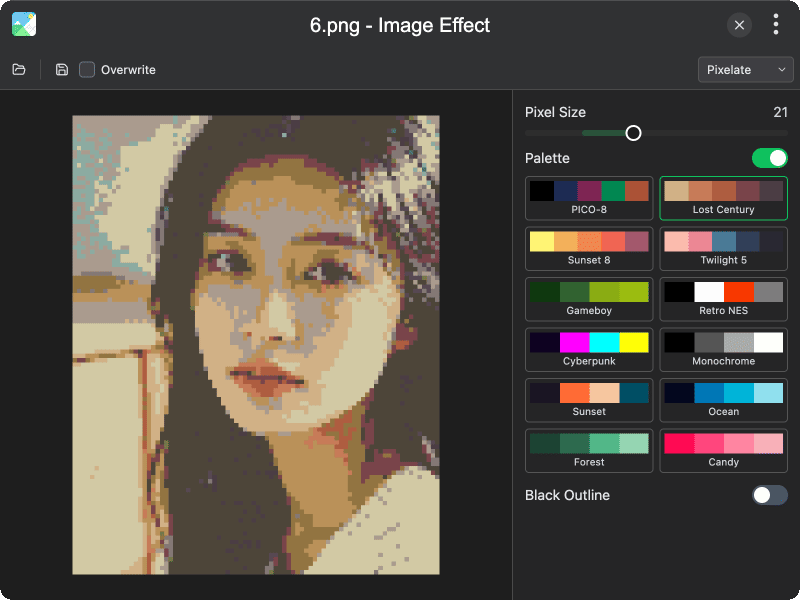
- Pixelate effect — turn images into pixel art with configurable block size, optional black outlines, and 12 color palettes (PICO-8, Gameboy, Retro NES, Cyberpunk, and more)
- ASCII effect — render images as ASCII art with cell size, contrast, invert, and character sets (Simple, Detailed, Blocks)
- Real-time preview — adjust parameters with live preview updates
- Drag & drop — open images by drag and drop or file dialog (PNG, JPG, WebP, GIF, BMP)
- Export — save results as PNG, JPG, or WebP; optionally overwrite the original file
- EXIF preservation — preserves original EXIF metadata when saving JPEG files
Usage
- Click Open Image or drag and drop an image onto the canvas
- Select an effect from the sidebar: Sketch, Pixelate, or ASCII
- Adjust the effect parameters with the sliders and options
- Preview the result in real time on the canvas
- Click Save Image to export as PNG, JPG, or WebP
- Enable Overwrite to save directly to the original file