
tinker-media-compressor
A media compression plugin for TINKER, supporting batch video and audio compression powered by FFmpeg.
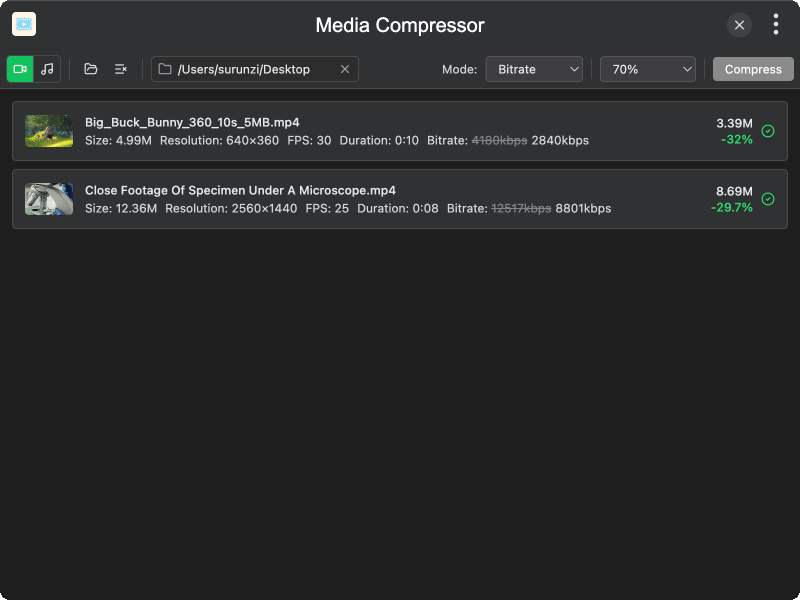
Features
- Video compression — compress MP4, MKV, AVI, MOV, and WebM files
- Audio compression — compress MP3, M4A, AAC, OGG, FLAC, and WAV files
- Multiple compression modes — video supports CRF (quality), bitrate, resolution, and target size; audio supports bitrate, sample rate, and target size
- Quality presets — five quality levels from Very Low to Excellent
- GPU acceleration — automatic GPU encoder detection for faster video compression
- Batch processing — compress multiple files at once with progress tracking
- Target size — compress to a specific file size (KB, MB, or GB)
- Custom output directory — save compressed files to a specified directory or alongside originals
- Media info display — view resolution, FPS, duration, bitrate, and sample rate for each file
- Cancel support — cancel compression at any time
Usage
- Switch between Video and Audio mode in the toolbar
- Click Open or drag and drop media files to add them
- Select a compression mode and adjust the quality level
- Optionally set an output directory
- Click Compress to start batch compression
- Monitor progress for each file; click Cancel to stop at any time
- Compressed files are saved to the output directory or alongside the originals