
tinker-node-manager
A Node.js version manager plugin for TINKER, powered by fnm via fnm-static.
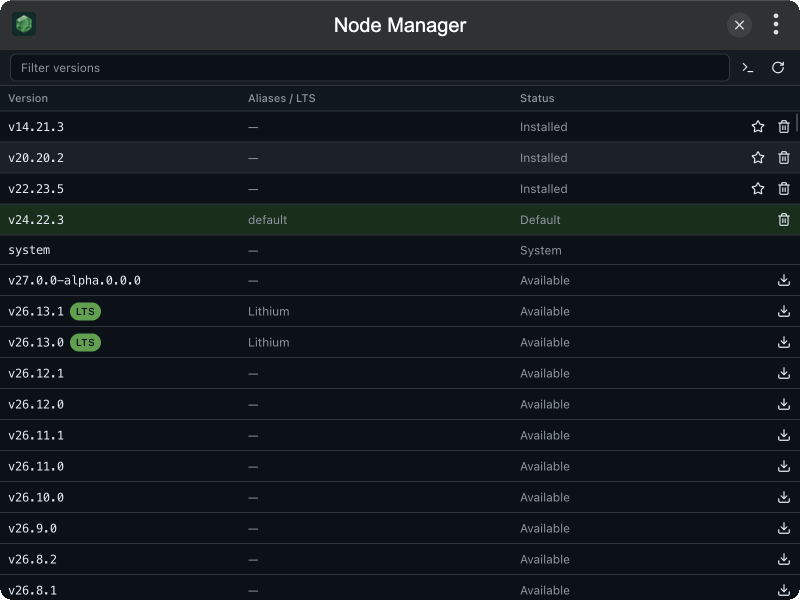
Features
- Browse versions — merged list of installed and remote releases, installed first
- Install / Uninstall Node.js versions from each row
- Set Default — mark an installed version as fnm default (highlighted row)
- Set up terminal — write fnm shell init using the bundled binary (no separate fnm install)
- Filter & refresh the version list
- MCP tools
list_versions,list_remote_versions,install_version,uninstall_version, andset_defaultfor agent / CLI automation
Installation
Download and install TINKER, then run:
bash
npm i -g tinker-node-managerRequirements
Versions are managed by the bundled fnm binary. Node installs live under fnm’s data directory (typically ~/.local/share/fnm). For terminal node to follow the default version, use Set up terminal in the toolbar (links fnm under ~/.tinker/tinker-node-manager/bin and writes init into your shell rc), then open a new terminal.
Shell targets: zsh → ~/.zshrc, bash → ~/.bashrc, fish → ~/.config/fish/config.fish, Windows → PowerShell profile (Documents/PowerShell/Microsoft.PowerShell_profile.ps1, or Windows PowerShell’s profile if that is the one already present).
Usage
- Browse installed and remote Node.js versions in the table
- Click Install on an available version, or Uninstall on an installed one
- Click Set Default on an installed version (the current default is highlighted)
- Use Set up terminal once so new shells pick up fnm
- Filter by version, alias, or LTS name; refresh to reload remote releases